What's New
Marketing Opt-in Widget & New Widget Configurations
We’ve added new widgets, new widget controls, and streamlined the way widgets are managed.
- Marketing Opt-in Widget – Grow your mailing list from any website.
- Centralized Dashboard – Centralized dashboard to manage global widget and checkout settings.
- New Appearance Settings – Start from built-in themes, and use new settings to gain more control over the look and feel of embeddable widgets.
- Usability Improvements – Widget previews, jargon-free messaging, easier embedding, and support for multiple themes.
Full details in our release blog.
Post-purchase Order Changes
Need to make changes to an existing order? Now you can purchase additional tickets and add-ons, and process transfers, refunds, and exchanges for individual items within an order without having to cancel and rebook an entire order. Patrons automatically receive an updated order confirmation for the entire order, eliminating the need for manual confirmations and reducing confusion at the box office.
Learn more in our release blog.
Audit Log
View a chronological list of all OTS in-platform activity to see what was changed, who changed it, and when.
Check out our release blog to learn more.
Exchange Fees
Now you can set optional fees to apply to ticket exchanges, with the option to let box office teams apply or waive them on a per-case basis. Fees can be a fixed dollar amount, or a percent of either the entire order or the value of the ticket(s) being exchanged.
For more information, check out the release blog.
Duplicate Contact Management
Automatically identify possible duplicate patron records, with an option to merge them together.
Learn more by reading our release blog.
More Powerful Seating Charts
We’ve redesigned how you build seating charts, manage holds, apply per-seat configurations, and manage availability for every performance.
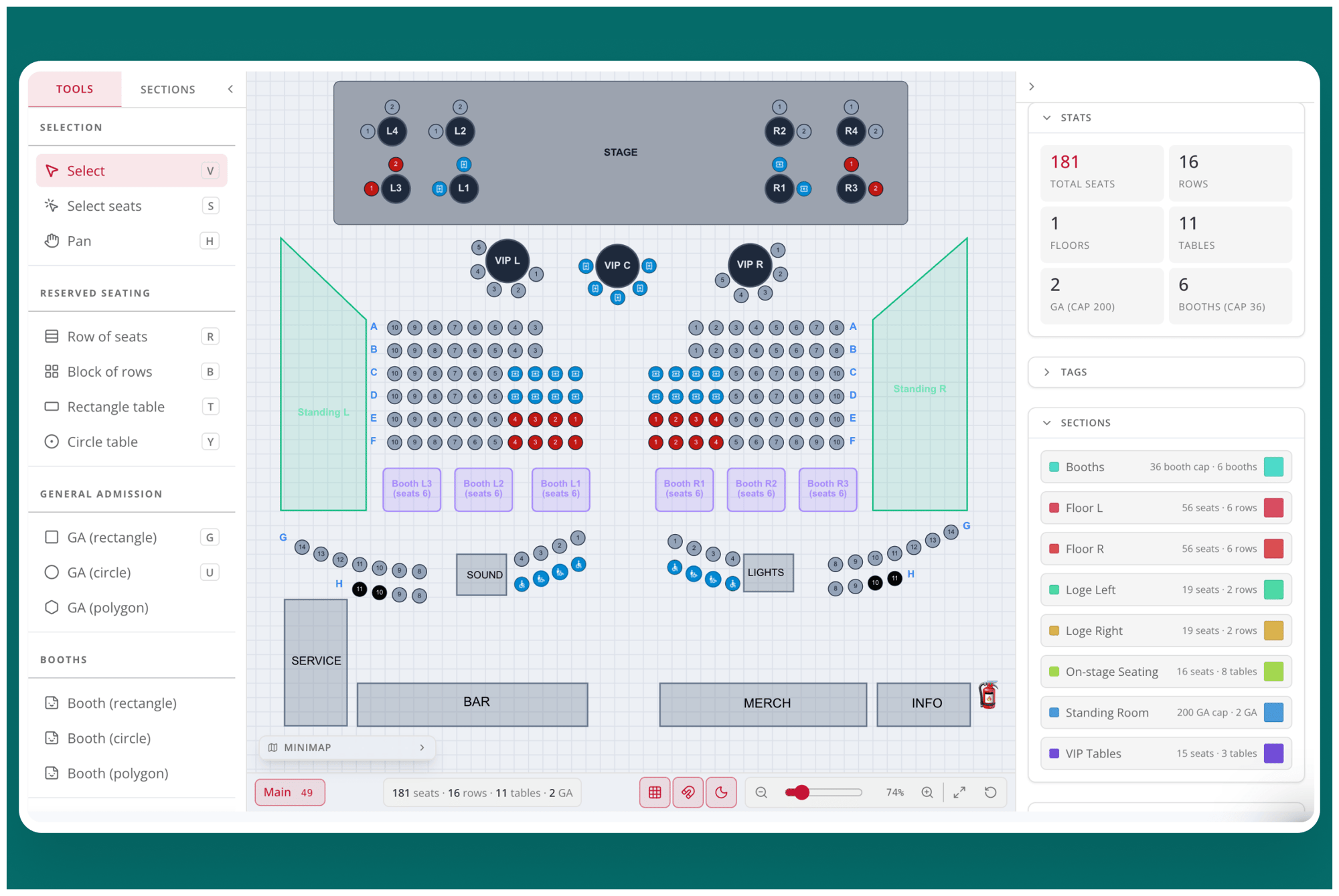
New Features
- Dedicated Management – A new Venue Management section in the main nav offers direct access to your venues, seating charts, and ticket holds
- New Seating Options – Add tables, booths, on-stage seating, general admission zones of any shape
- Easier Chart Creation – The redesigned seating chart builder is faster and easier, making it possible to build complex charts in minutes
- Bulk Editing – Work faster by multi-selecting any mix of seats to apply shared settings with one click
- Visual Workflows – Replace legacy list views with the new, intuitive visual workflow that makes it easy to apply holds, blocks, and seat settings
- Post-sale Updates – Need to change a label, add an aisle, or release a new block of seats? Now you can make changes to seating charts even after you’ve gone on sale
Learn more in our release blog.
Custom Hold Types
It’s now possible to define multiple types of ticket holds, making it easier for box office teams to know which seats are reserved for which audiences.
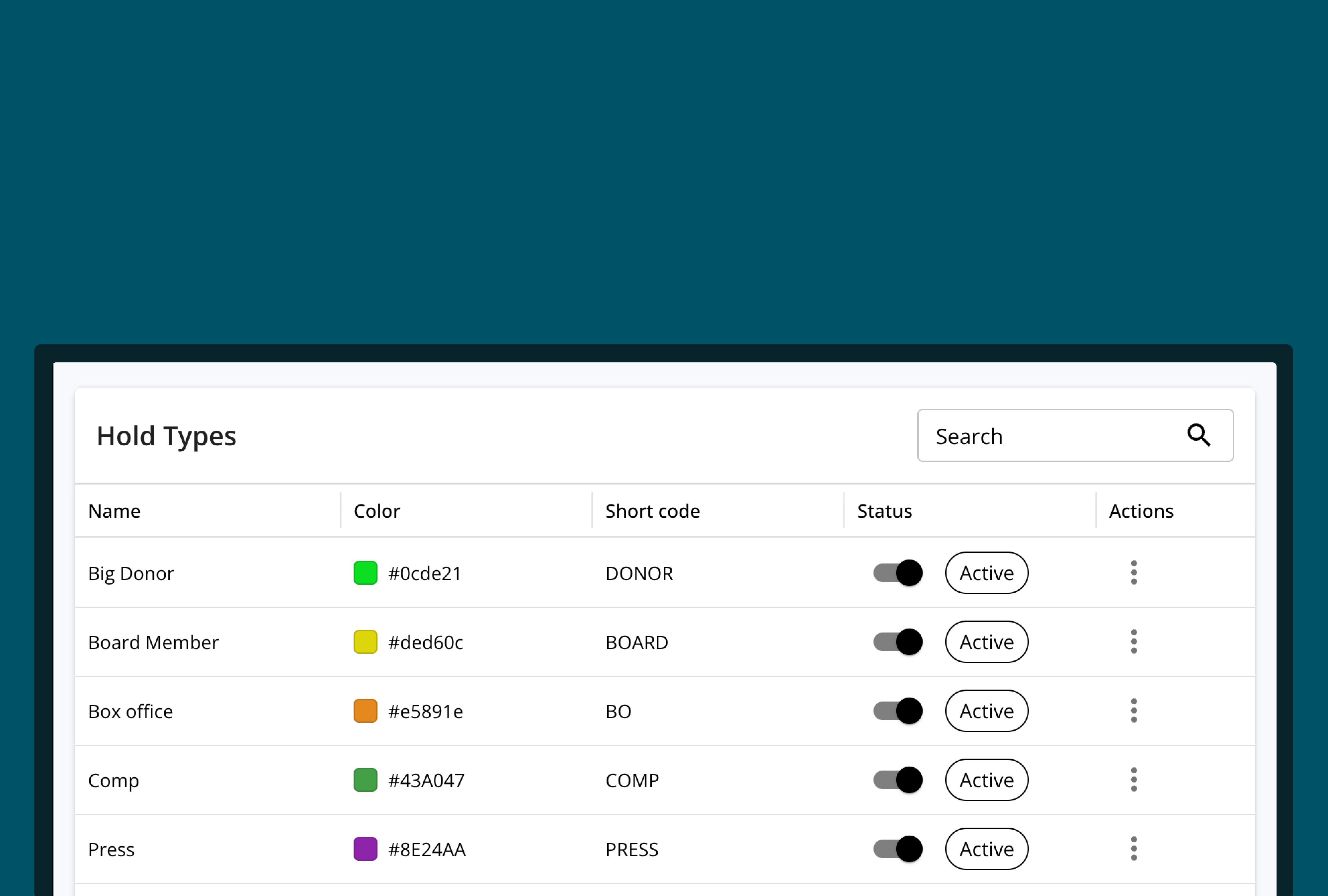
- Create Hold Types – Define custom seat hold types to differentiate between box office tickets, member-only tickets, invited press, promoters, major donors, alumni, or any audience
- Hold Expirations – Set a time for unused held seats to automatically be released for general sale
- Hold List – See a complete list of every hold associated with a particular production or performance
Learn more in our release blog.
Subscription Renewals
We’ve made it faster and easier for box office teams to build subscription packages, and to market them both to last year’s subscribers and the rest of your audience.
Key Benefits
- Build Subscriptions Faster – Create next year’s subscriptions from existing subscriptions, significantly speeding up the time it takes to build and launch your season
- Automatically Announce New Subscriptions – Automatically invite last year’s subscribers to resubscribe, and automatically announce new subscriptions to all non-subscribers
- Improve Accuracy – New subscriptions inherit seating sections, ticket types, and custom configurations, which eliminates double-entry, speeds up the creation flow, and reduces the chance of human error
Learn more in our release blog.
Redesigned Order Details Page
We’ve revamped the order details page to unlock new tools and efficiencies for box office teams.
New Features
- Top-level “order overview strip” displays the order total, amount paid, refunds, items count, order date, and confirmation code
- Displays patron contact details (name, phone, email, household, tags) in an editable card
- Groups order items by production, and take per-event actions via buttons
- Shows a financial history with a live breakdown of subtotal, fees, tax, and payment status
- Payment history timeline shows a log of all payments, refunds, and exchanges
- Clear CTAs let box office team collect payments for pending/reserved orders, send reminders, and process refunds and manage exchanged directly from the order page
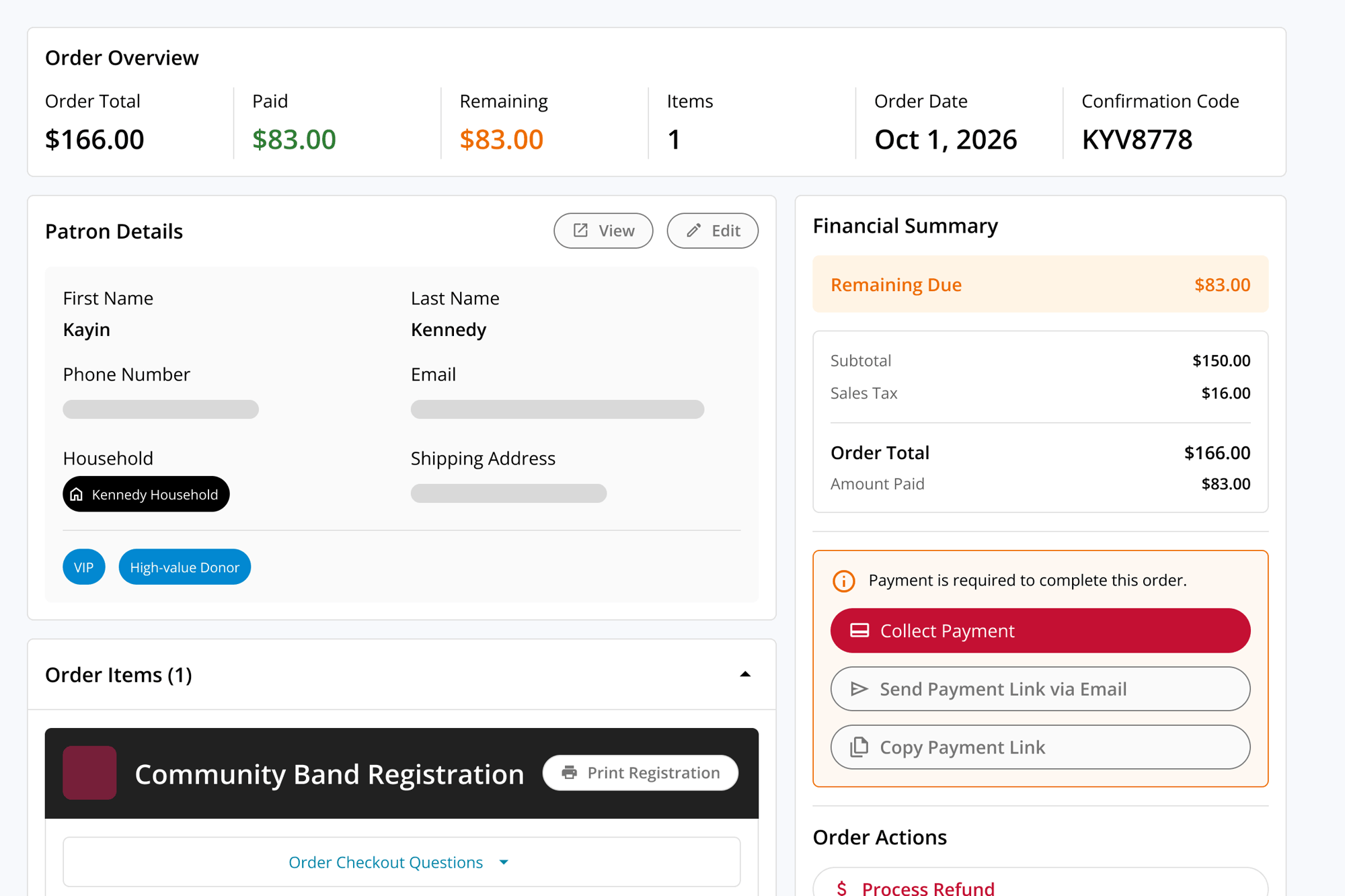
Taken collectively, the redesigned order management page doesn’t just look nicer (though we think it’s pretty great); it unlocks new tools and efficiencies that enable box office teams to quickly access important information, take action, and support patrons.
New Fee Controls
We’ve added new custom fee configurations, giving box office teams even more control over your fee structures.
Now You Can:
- Absorb fees on add-ons
- Set unique fees for add-ons and tickets
- Make custom fees a percent of a cart’s value, rather than a fixed value
Split Payment Support
Split payments gives your box office team two new ways to handle high-value transactions:
- Deposit + Balance — Reserve a spot by submitting a deposit now, then pay the remaining balance later.
- Split Tender — Pay for a single order using multiple payment types.
Great for:
- Summer camps and workshops
- Classes and multi-event series
- Group sales
- Premium ticket + add-on bundles
Together, these two modes make it significantly easier to process high-value sales without asking patrons to pay everything upfront.
Learn more in our release blog.
Redesigned Reporting Portal
We’ve redesigned the in-platform reporting portal to make it easier to quickly access the insights you need.
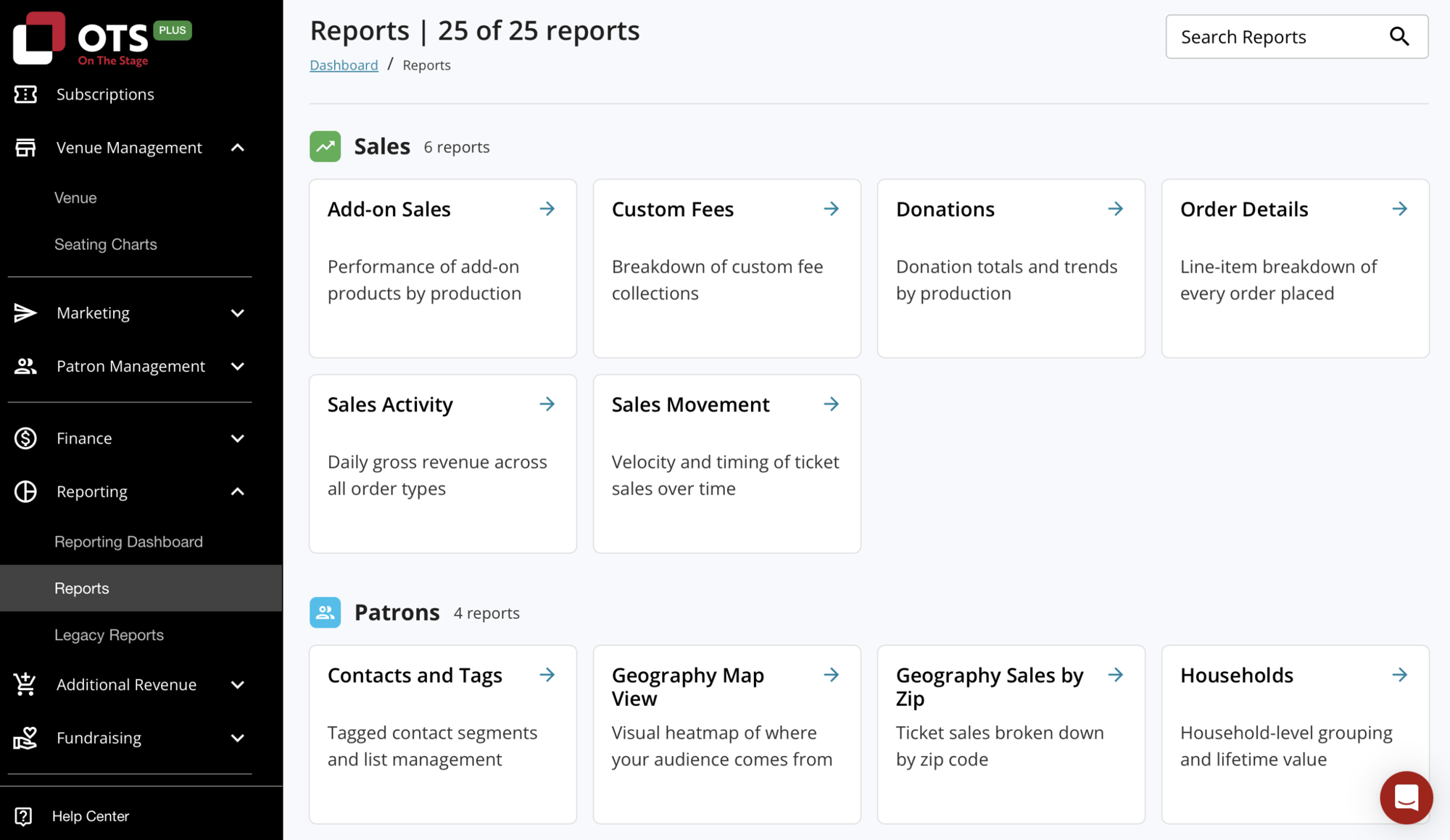
In addition to a clear, friendlier look and feel, the redesigned portal improves discoverability via a new search bar, and by grouping reports by functional area.
Multi-checkout Support
Patrons are now able to purchase tickets to multiple productions and performances in a single transaction, significantly improving the patron experience and reducing the time and effort required to make multiple purchases.
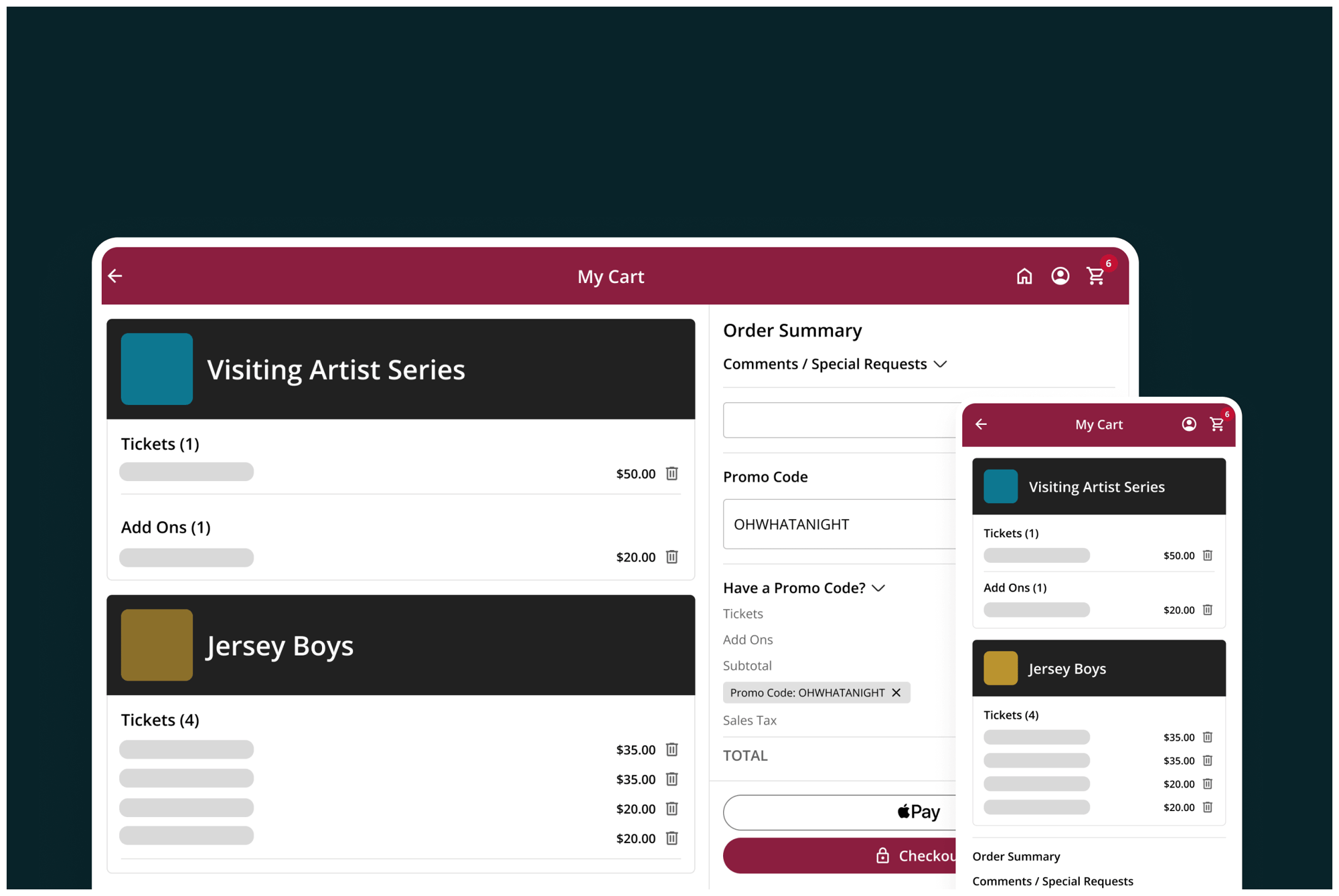
Customers can now configure their box office to allow sales in one of three ways:
- Single Performance: Patrons can only purchase tickets to a single performance (i.e. Shrek at 7 PM on Friday)
- Single Production: Patrons can purchase tickets to multiple performances of the same production in one transaction (i.e. Shrek at 7 PM on Friday and 2 PM on Sunday)
- Multi-cart: Patrons can purchase tickets to any mix of productions and performances in one transaction (i.e. Shrek at 7 PM this Friday and Noises Off at 7 PM next Saturday)
To learn more, read our release blog.
Event Gallery View
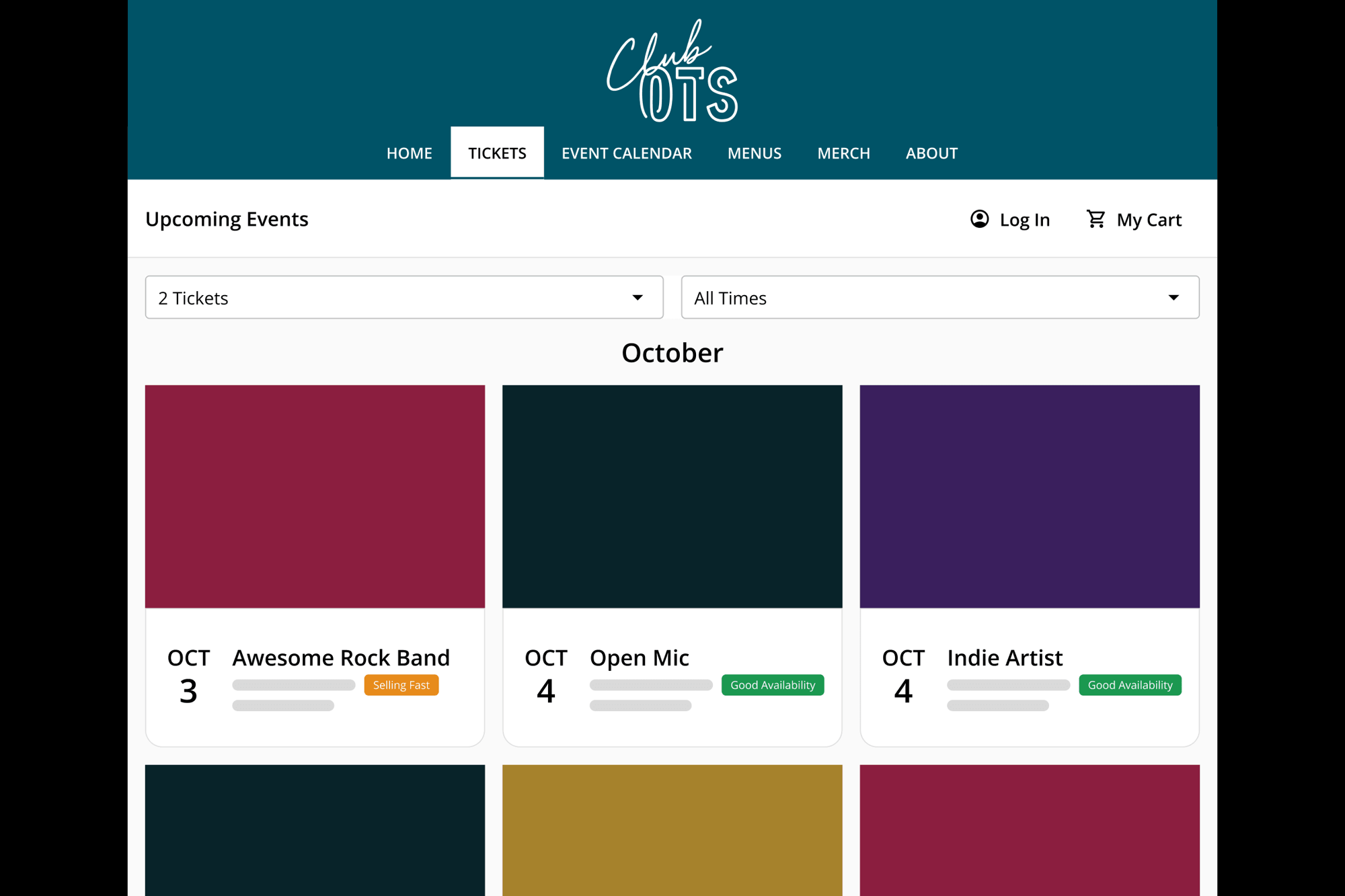
Display multiple upcoming events in a new unified gallery view that displays the event poster, making it easier for ticket buyers to see all of your upcoming programming. Gallery view joins the existing calendar, page, and list views for upcoming events, and is designed to improve event discovery for high-volume organizations such as comedy clubs, cabarets, and performing arts centers.
New Integrations
We’ve added several new integrations that make it easier to sync OTS information with other platforms. These integrations save time and improve accuracy by mitigating or eliminating the need to manually reconcile data between multiple systems.
Finance & Accounting
More easily sync OTS financial information with leading accounting platforms such as QuickBooks, Xero, Wave, and Zoho with optimized data exports.
Marketing
Automatically sync OTS patron contact information, audience segments, and more with Klaviyo. This joins our growing suite of marketing integrations that already includes Mailchimp and Constant Contact.
New Presale Options
Improved functionality for subscriptions, presales, group sales, and venues with non-traditional seating setups.
- Offer subscription presales
- Configure multiple pre-sale windows for events, such as one for subscribers and another for volunteers
Plays: Always-on Marketing Automation
Keep patrons engaged automatically with OTS Plays — a new suite of automated marketing campaigns built for performing arts organizations.
Plays automatically deliver personalized, targeted outreach at key moments in a patron’s journey — from thanking first-time attendees to promoting subscriptions and soliciting donations — all using the patron data you already have in OTS. As each patron’s relationship to your organization evolves over time, Plays dynamically update to ensure that every patron receives the right message at the right time, which in turn drives higher engagement, retention, and revenue.
Plays are easy to set up, always on, easy to customize – no technical jargon or marketing degree required.
To learn more about Plays, check out the Plays release blog.
Patron & Donation Management Improvements
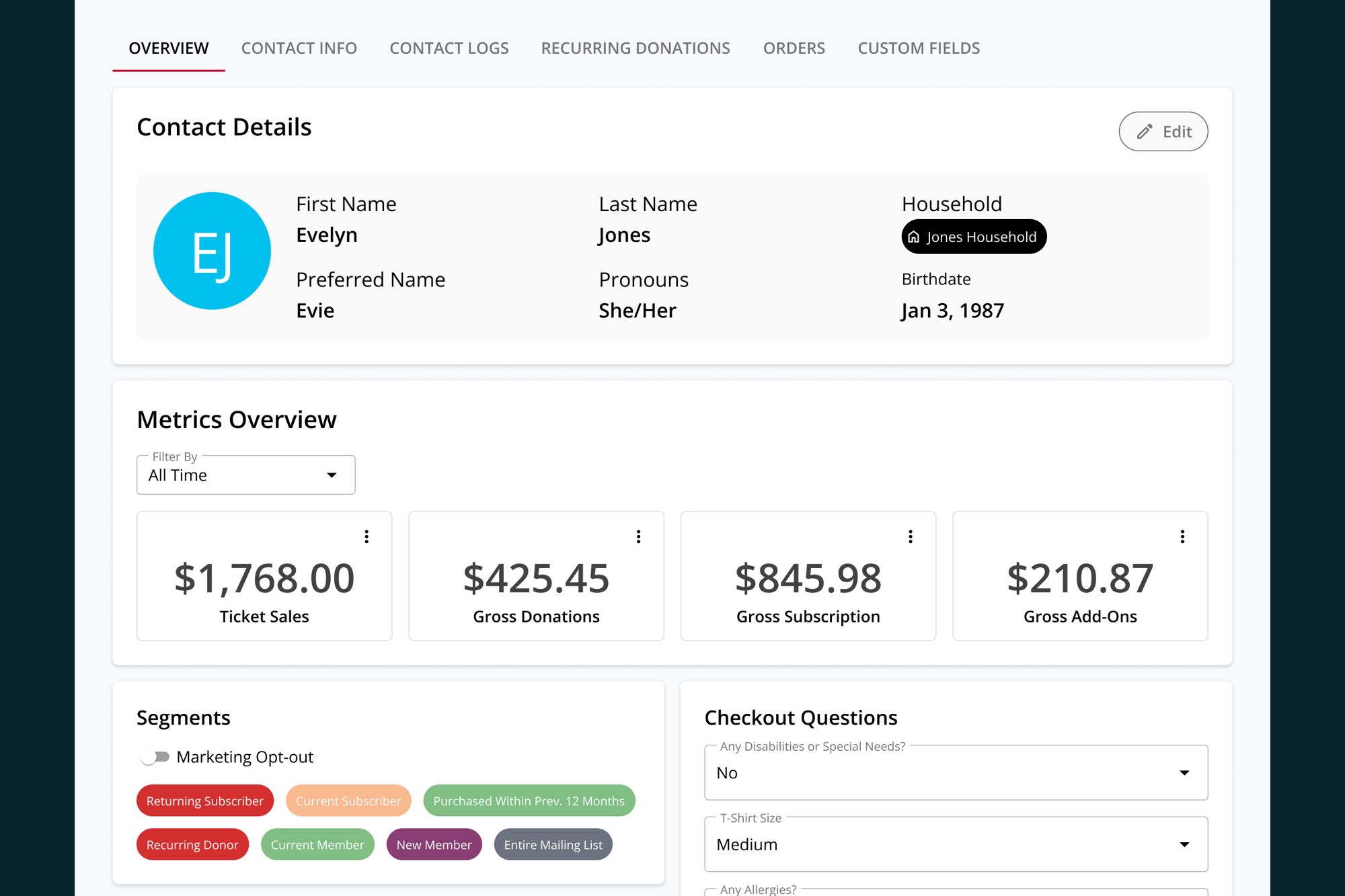
New features improve and enhance the ability to capture, track, and organize patron information, and to more effectively track and attribute donations.
- Offer box office-only fundraisers that aren’t visible online to more easily collect, manage, and track unrestricted donations
- Attribute cash donations to individual patrons and specific fundraisers
- Add custom tags to patron profiles to more clearly organize patron lists, and show tags on check-in lists to surface important information to box office teams
- Organize patrons into households and access household-level insights
- Improved donation tracking and reporting in patron profiles
- Easier access to key features and relevant insight via redesigned patron profiles and contacts dashboard
To learn more, read our release blog.
Ready to get started?
See how OTS handles every ticket type, every event format, and every venue — without extra tools.
Request Demo