
Skip to content

NEW Download the 2026 Performing Arts Trends Report Get your copy →

A full theater audience in red velvet seats, seen from the edge of the stage
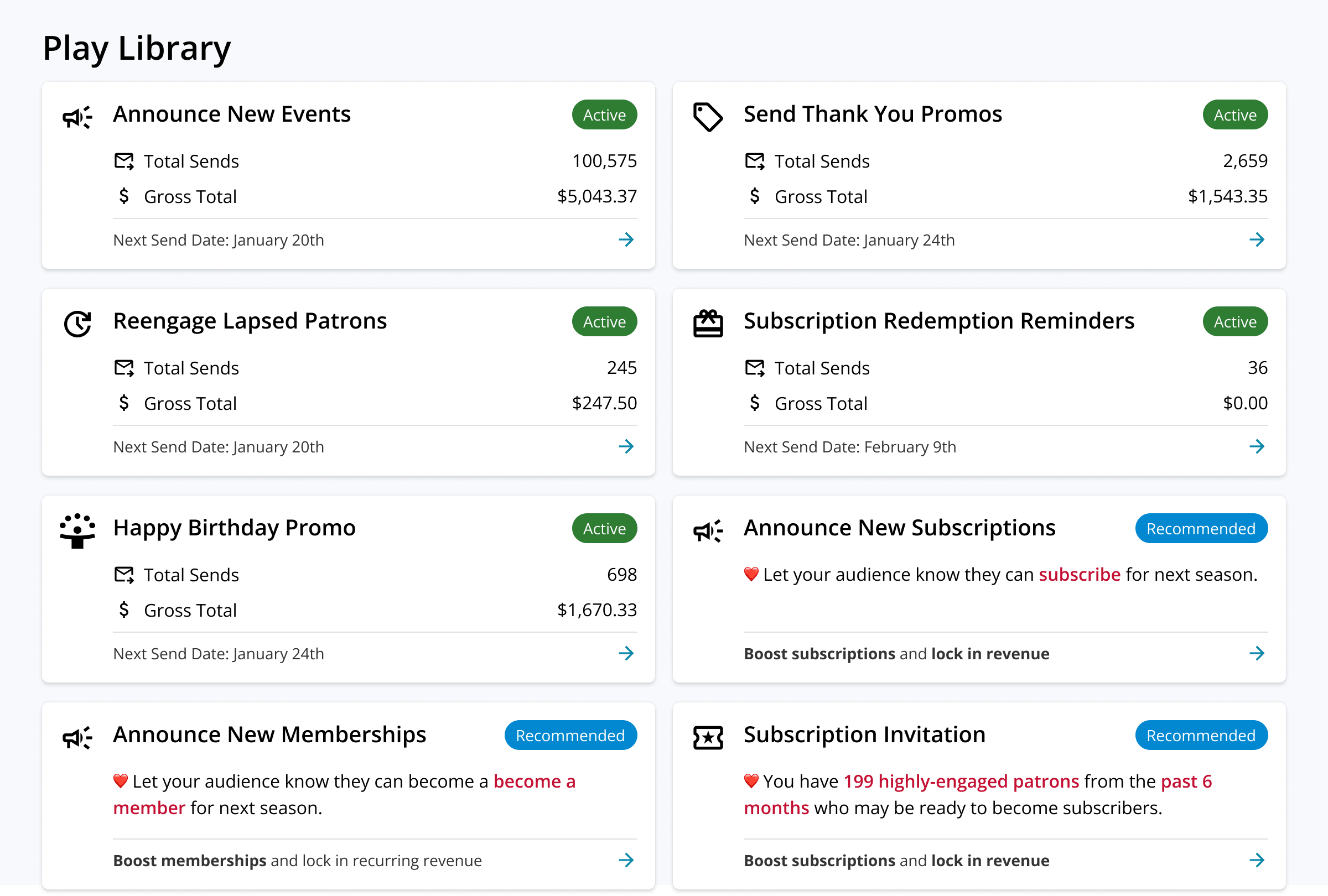
The Plays library in On The Stage

Marketing Automation

Keep your audience engaged over time, automatically.

Reach the right audience with the right message at the right time with an always-on audience engagement engine built for the performing arts and live entertainment.

THE PROBLEM

It's harder than ever to keep audiences engaged.

A reliable audience that shows up year after year is critical to the success of your organization, and consistent audience engagement is the backbone of building those relationships. But shifts in audience preferences and behaviors, and in how and where they receive information, has made that engagement more challenging - and your old playbook that used to work now only offers diminishing returns.

Manual Workflows

Mailing lists and audience insights that exist in different systems, or on paper, that make every announcement, promotion, and follow-up an individual task that requires time - and therefore sometimes doesn't happen at all.

Generic Outreach

Email blasts to your entire mailing list produce limited results, and lack the personal touch required to build and sustain meaningful audience relationships - and lead to better outcomes.

Need for Expertise

Building more-effective marketing strategies requires additional expertise that many institutions lack, time they don't have, or tools that require a computer science degree to operate.

WHAT SUCCESS LOOKS LIKE

Consistent, personalized engagement that keeps audiences coming back.

Selling more tickets, raising more money, and filling more seats are the byproduct of an engaged audience that feels connected to your organization and keeps showing up. OTS automates that connection, so your organization can sustain, expand, and thrive season after season.

  • Automatic Outreach

    Systems that use what you know about your patrons to automatically stay in touch with the announcements, promotions, and information that matter most to them - without you ever lifting a finger.

  • Personalized Messaging

    Audience lists that automatically adapt with your audience over time, ensuring that you always send the right message to the right audience at the right time based on who they are and what they care about.

  • Simplified Workflows

    Set-it-and-forget-it marketing campaigns that can be setup in just a few minutes using plain English, and that continue to run in the background over time.

PLAYS

Plays: Your new silent partner.

A Play is an always-on marketing flow that ensures the right message always reaches the right audience. Plays are built around key moments in a patron's relationship to your organization, with the goal of increasing retention, growing audience engagement, and fostering ongoing loyalty.

Easy Setup

Build a Play and set it live in less than two minutes, without tech speak or marketing jargon.

Always On

Set it up once and it runs on the cadence you choose until you turn it off.

Self-Updating

As a patron's relationship with your organization changes, Plays automatically update with them.

Customizable

Change the copy, set the terms of an offer, and adjust the audience.

Measurable

See sends, conversions, and revenue per Play, along with the patrons who came back because of it.

PLAYBOOK

Built for Every Phase of the Patron Journey

Your relationship with a patron changes over time, and Plays ensure you're always up to date. Our growing library of Plays (known as Playbook) allows you to reach patrons at every phase, without the hassle of audience lists or calendar reminders.

AWARENESS

Announce New Programs

Let your entire audience base know every time you publish a new event, subscription, or membership.

A symphony orchestra's new-season subscription announcement Play, on desktop and mobile

RETENTION

Turn a First Visit Into a Second

Incentivize return visits with promotional Plays to thank first-time patrons, wish patrons a happy birthday, and remind subscribers and members when they have unredeemed tickets or perks.
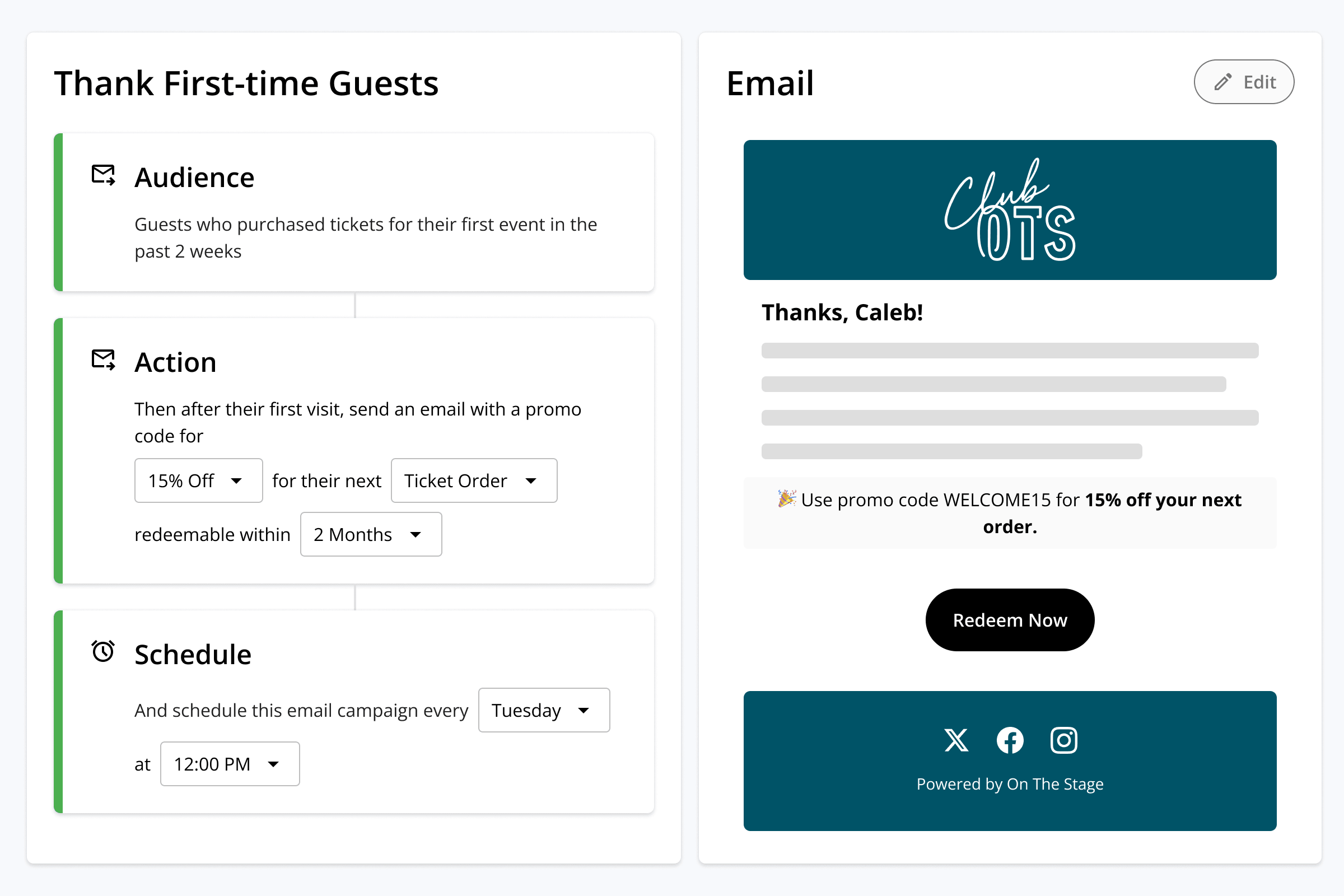
The Retain First-time Buyers Play for a club in On The Stage

WINBACK

Re-engage Lapsed Patrons

Send one-time offers to patrons who haven't been back in a given time frame, to incentivize them to return.
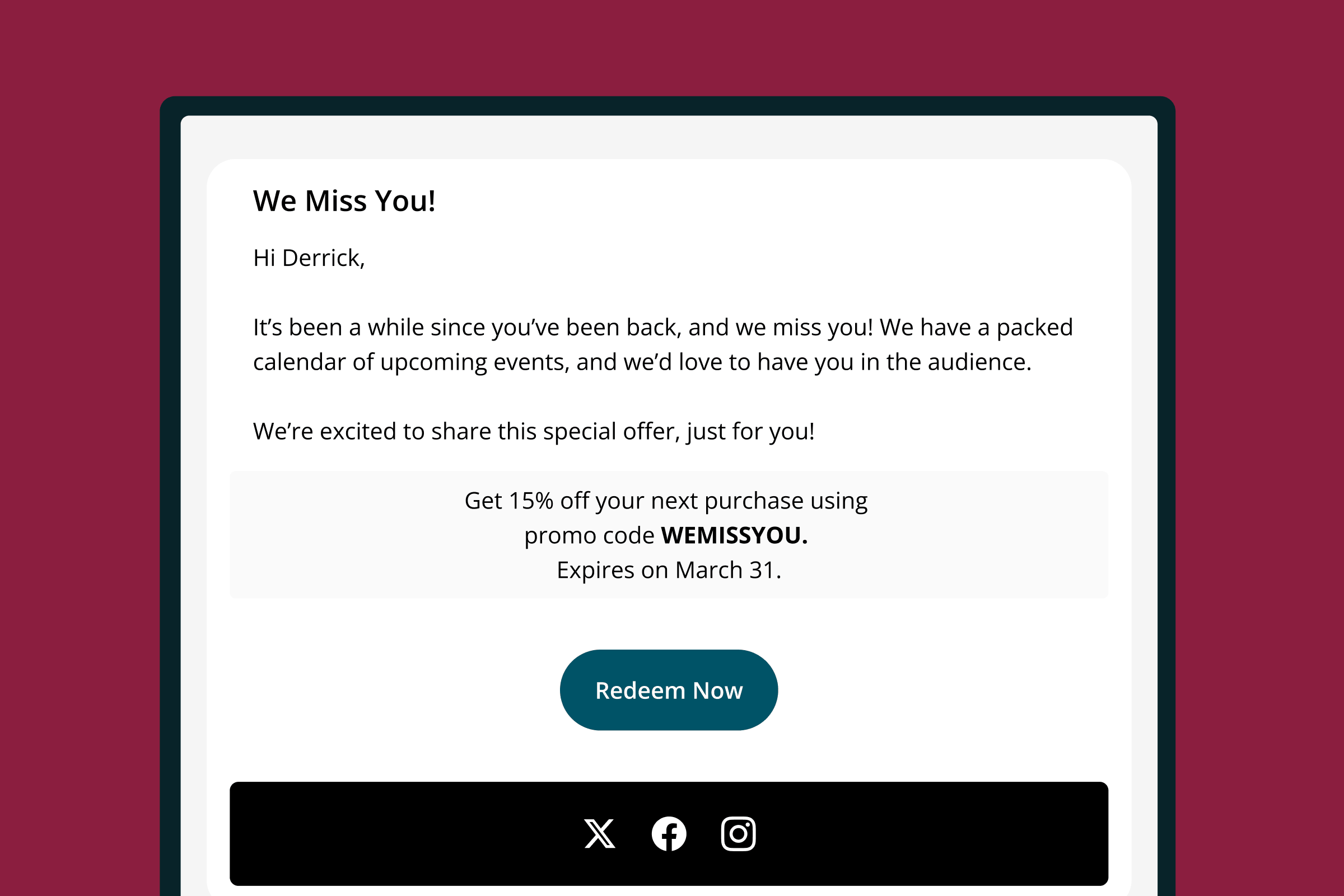
The patron email sent by the Re-engage Lapsed Patrons Play

GROWTH

Turn Your Regulars Into Subscribers & Members

Automatically invite repeat patrons to become subscribers or members, based on criteria that you set.
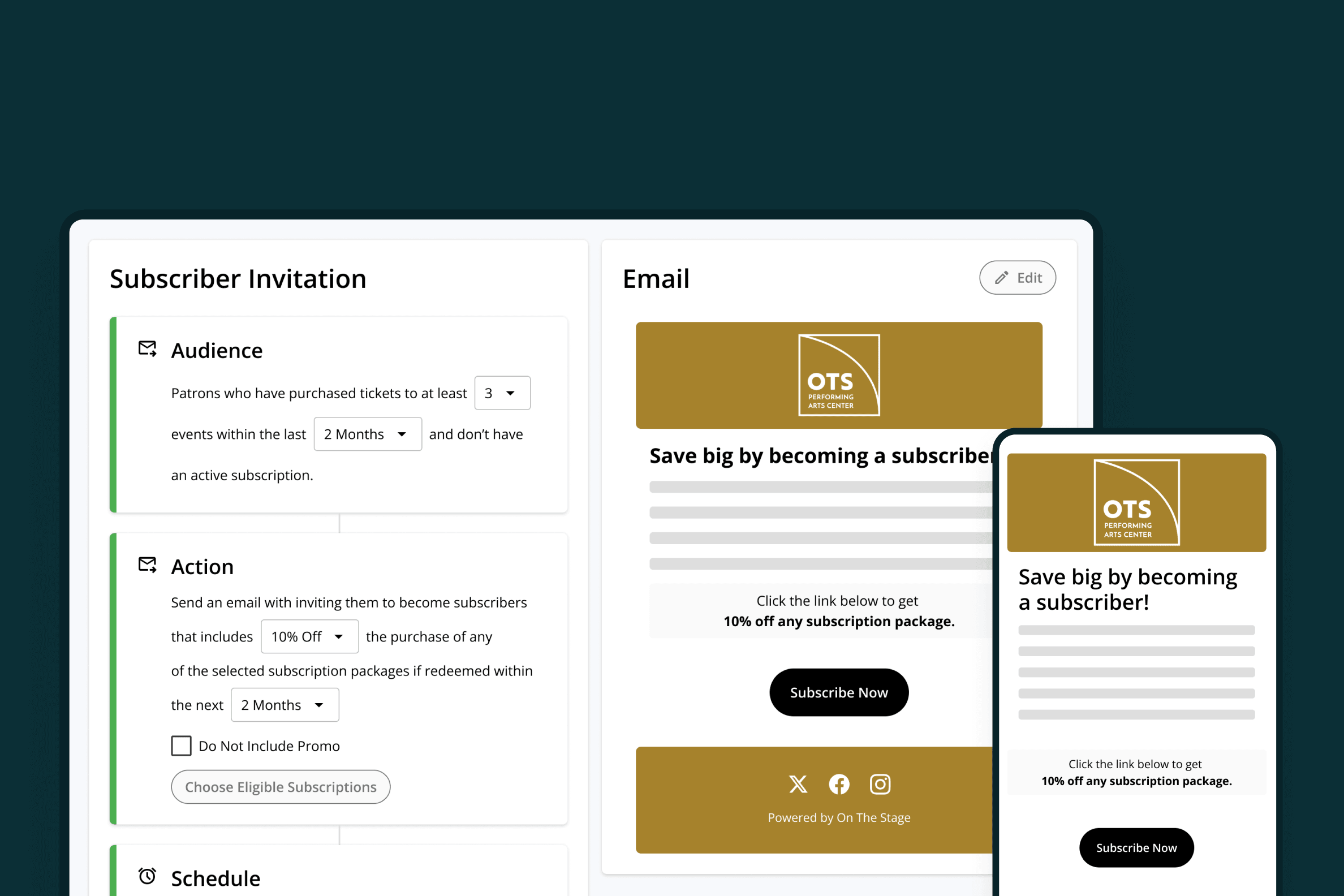
A performing arts center's Subscriber Invitation Play, on desktop and mobile

GIVING

Ask the Right People at the Right Time

Set-up annual giving campaigns that provide ticket buyers, subscribers, and members an additional opportunity to give.
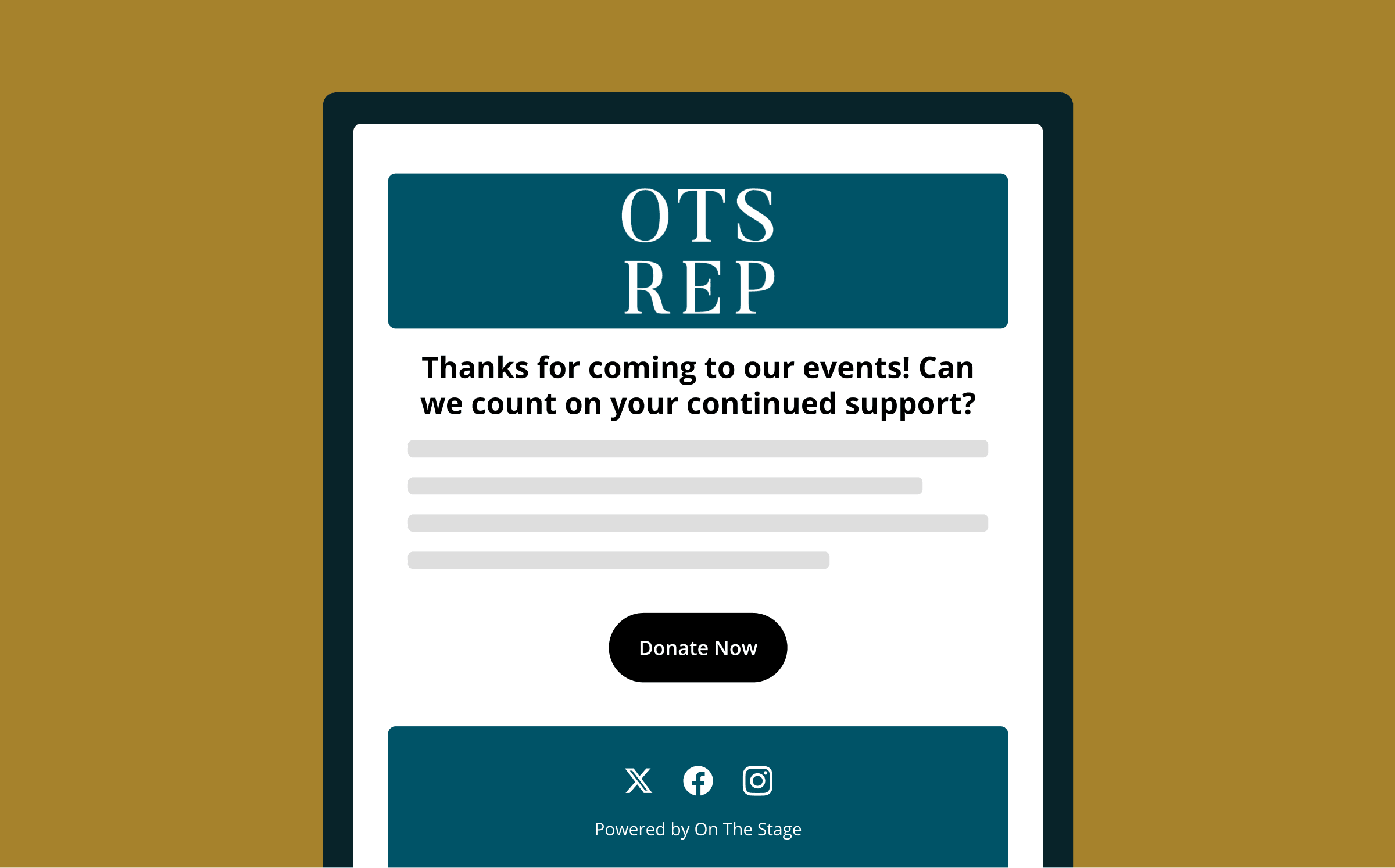
The patron email sent by the Ticket Buyer Donation Play for a repertory theater

SOCIAL MEDIA

Social media posts that run on their own.

A steady promotional presence on social media is critical to engaging audiences, but managing a social media calendar across multiple platforms can feel like a full-time job. On The Stage streamlines your social presence with automatic social posts that resonate with your audience.

Multiple Platforms

Run promotional posts on Facebook, Instagram, TikTok, and X.

Content Creation

Use your event art and description to automatically create posts and captions.

Scheduling

Automatically pre-schedule up to five posts for each event that publish automatically.

Measurement

View impressions, likes, and sales attribution for each post.

PROMO CAMPAIGNS

Automatic promo campaigns for events and giving campaigns.

OTS automates event and campaign communications to ensure your ticket buyers and donors are always in the know.

Event Reminders

A reminder lands with ticket holders the day before curtain, carrying parking, concessions, and merchandise alongside it.

Post-Event Thank-Yous

A thank-you goes out after the performance featuring what's coming up next, while goodwill is highest.

Cart Abandonment Nudges

Patrons who start a checkout and don't finish get a nudge back to their cart, leading to a 25% increase in re-captured sales (average of all OTS customers, April–June 2026).

Fundraiser Campaigns

Every fundraising campaign generates its own email and social sequence timed to its launch and its close, so nobody has to write or schedule a thing.
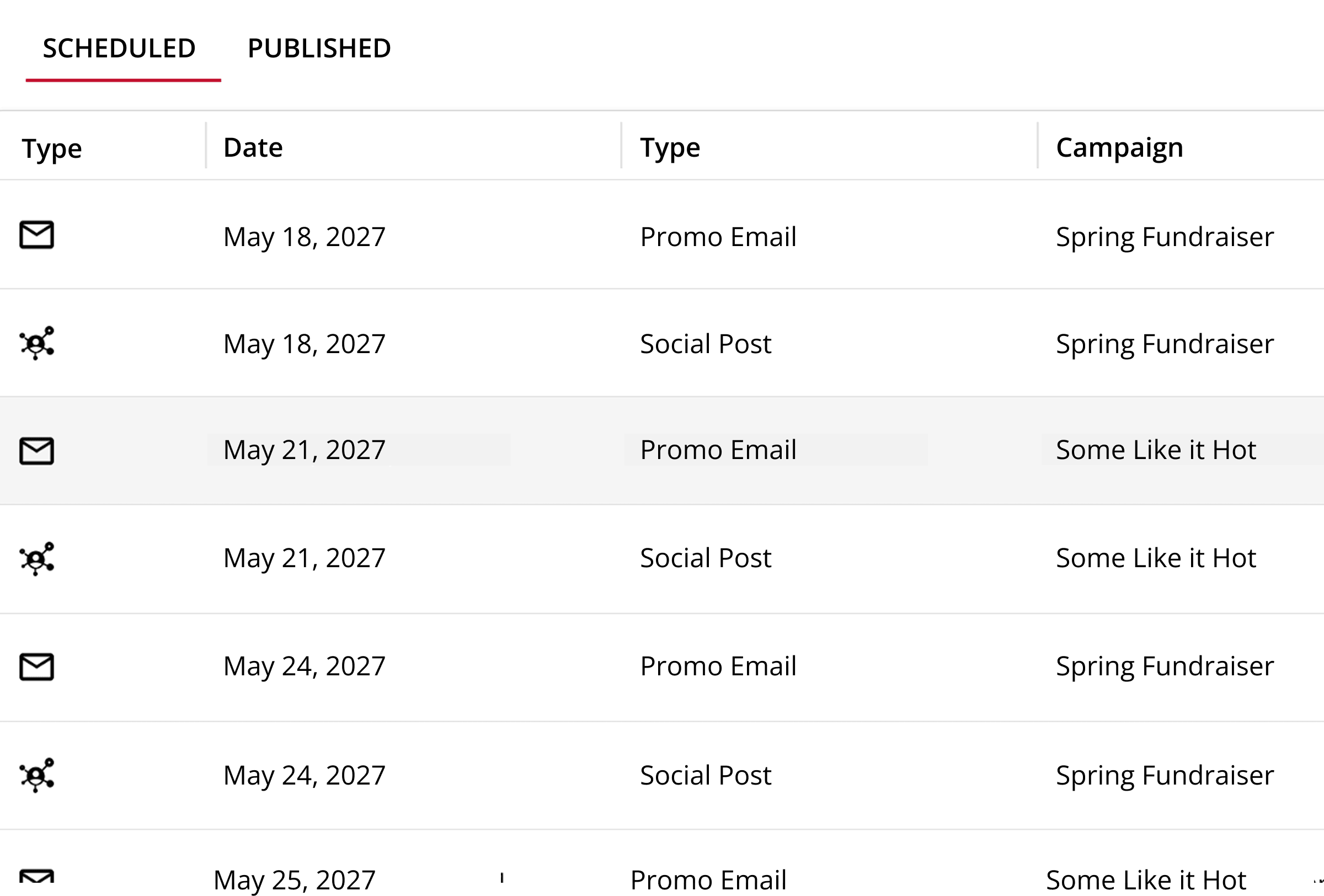
The combined social and email promo campaign calendar for an event in On The Stage

OTHER FEATURES

Custom Copy

Tweak the language of auto reminders and thank-yous so that every email sounds like you.

Send Controls

Easily skip individual emails and posts without affecting the rest of the schedule.

One Calendar

See a single view of every email and social post, and access performance and sales metrics for each email and post.

RELATED SOLUTIONS

Marketing automation, applied to every goal.

Plays power the outreach behind each of these solutions.

Promote Events

Announce every show to everyone, the minute it goes on sale.

Explore →

Grow Your Audience

Turn a first visit into a habit, and a habit into a subscription.

Explore →

Retain Patrons

Stay in touch between productions without anyone writing an email.

Explore →

Raise Money

Ask the patrons most likely to give, at the moment they're most likely to say yes.

Explore →

FAQ

Common questions about marketing automation.

What is marketing automation for a performing arts organization?

It's outreach that sends itself based on what a patron has actually done - a thank-you after a first show, an invitation to subscribe once someone attends often enough, a note to someone who hasn't been back in a year. On The Stage calls these Plays. You set one up once, and it keeps finding the right patrons and reaching out on its own.

How do I get first-time ticket buyers to come back?

Turn on the Play that thanks first-time patrons. It sends a warm follow-up after someone's first visit with an offer that brings them back, and it runs for every new patron from then on without anyone remembering to send it.

How do I bring back patrons who haven't attended in a while?

The Re-engage Lapsed Patrons Play reaches anyone who hasn't returned within a window you set - three months, six months, a year - and gives them a one-time offer to return. You decide how long away counts as away.

Can I run automated marketing if nobody on our team is a marketer?

Yes. Plays are built in plain English, and each one arrives with its audience, its offer, and its copy already in place. Setup takes under two minutes and calls for no marketing background or technical experience.

What happens to our marketing when the person who set it up moves on?

It keeps running. A Play stays on until someone turns it off, so a season built by last year's team, a graduating student box office, or an outgoing volunteer board keeps working straight through the handoff.

How do I turn repeat ticket buyers into subscribers or members?

The Subscription Invitation Play watches for patrons buying often enough to be worth asking - you set the threshold - and invites them to become subscribers or members.

Can On The Stage ask my audience for donations automatically?

Yes. Two giving Plays make the ask for you: one to frequent ticket buyers, and one to subscribers who have actually attended. Both are capped at once a year. Fundraising campaigns also generate their own email and social sequence timed to the campaign's launch and close.

Does On The Stage promote my events on social media too?

Yes. Every event you publish gets a run of promotional posts built from your own show art and captions, scheduled and published across Facebook, Instagram, TikTok, and X.

How do I know whether automated marketing is actually selling tickets?

Every Play reports sends, conversions, and revenue, along with the patrons who came back because of it. Automated emails and social posts report the same way, in one calendar view alongside everything else you have scheduled.